

Skills
Extend your agents with reusable skill modules
Skills are reusable capability modules that extend your coding agents with specialized functionality. They follow the open Agent Skills standard and work across all supported agents—Claude Code, Codex, OpenCode, Cursor, Gemini, Roo Code, and Mistral Vibe.
Browsing Skills
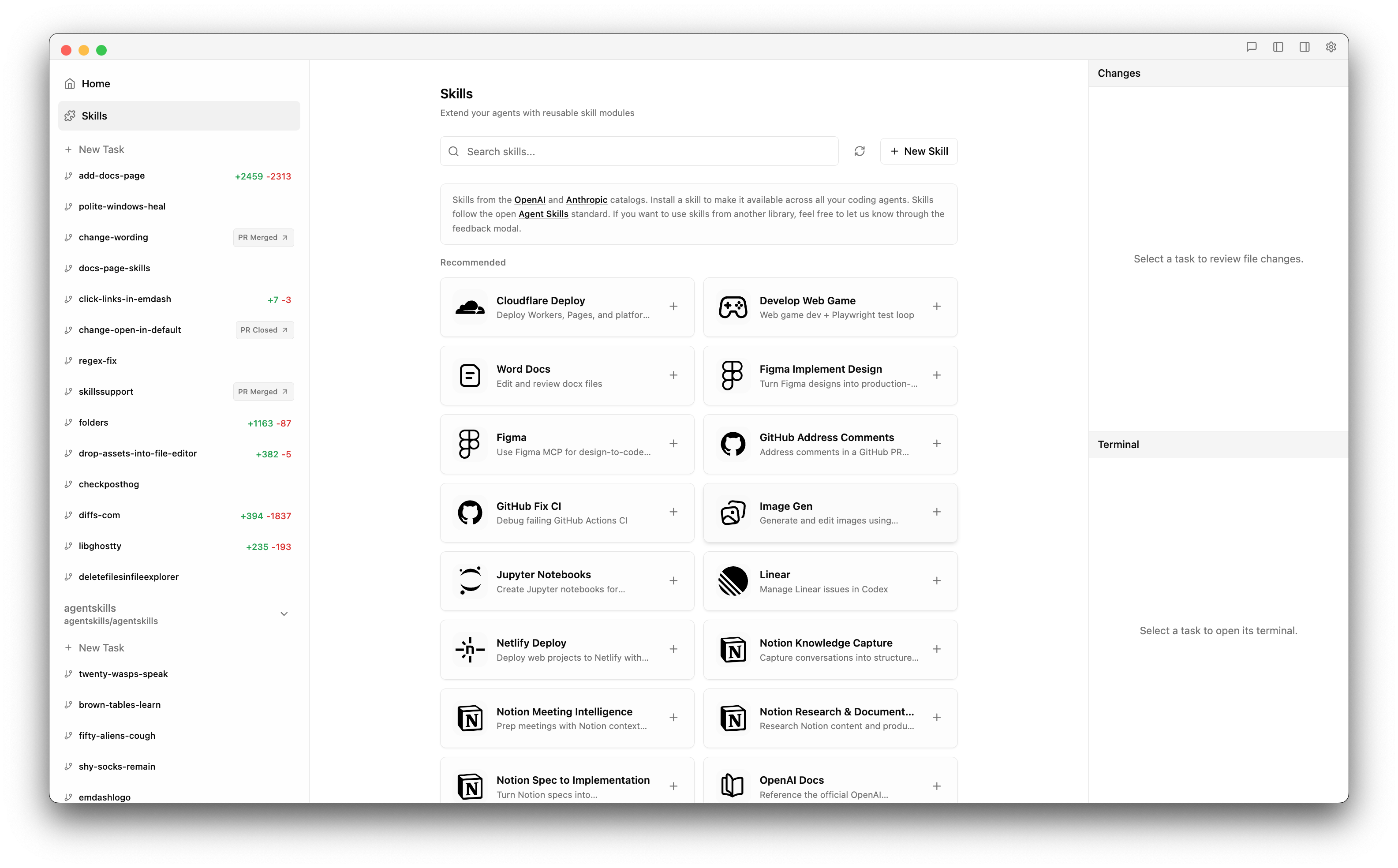
Open the Skills view by clicking Skills (puzzle icon) in the left sidebar. You'll see a catalog of available skills sourced from:
Use the search box to filter by name or description. Click Refresh to fetch the latest skills from GitHub.
If you want to use skills from another library, feel free to let us know through the feedback modal in the app.
Installing a Skill
- Find a skill in the catalog
- Click the skill card to view details, example prompts, and documentation
- Click Install
Emdash downloads the skill to ~/.agentskills/ and automatically syncs it to all installed agents on your machine. The skill is immediately available in your next agent session.
Uninstalling a Skill
- Click an installed skill card
- Click Uninstall in the detail modal
This removes the skill from ~/.agentskills/ and removes the symlinks from all agent directories.
Creating Custom Skills
- Click New Skill in the Skills view
- Enter a name (lowercase, hyphens, 2–64 characters) and description
- Click Create
Emdash generates a SKILL.md file in ~/.agentskills/<your-skill>/ and opens the directory so you can edit it. The file uses YAML frontmatter for metadata:
---
name: 'my-skill'
description: 'What this skill does'
---
# My Skill

Instructions and documentation for the agent...
Custom skills sync to all installed agents just like catalog skills.
How Skills Work
Each skill is a directory containing a SKILL.md file. When installed, Emdash creates symlinks in each agent's config directory:
| Agent | Skill location |
|---|---|
| Claude Code | ~/.claude/commands/<skill>/ |
| Codex | ~/.codex/skills/<skill>/ |
| OpenCode | ~/.config/opencode/skills/<skill>/ |
| Cursor | ~/.cursor/skills/<skill>/ |
| Gemini | ~/.gemini/skills/<skill>/ |
| Roo Code | ~/.roo/skills/<skill>/ |
| Mistral Vibe | ~/.vibe/skills/<skill>/ |
This means skills you install through Emdash also work when you run these agents outside of Emdash.
Example Skills
The catalog includes skills for many common workflows:
- Deployment: Cloudflare, Vercel, Netlify deploy
- Design: Figma integration, design implementation
- GitHub: Address PR comments, fix CI failures
- Documentation: Word docs, Jupyter notebooks
- Content: Image generation
- Integrations: Linear, Notion, Stripe, Twilio
Each skill includes an example prompt showing how to invoke it.
Tips
- Skills persist across Emdash sessions—install once, use everywhere.
- Click the terminal icon on an installed skill to open its directory and inspect or edit the
SKILL.mddirectly. - Custom skills appear in the "Installed" section alongside catalog skills.
- If an agent can't find a skill, make sure the agent is detected by Emdash (check the Skills view footer for detected agents).